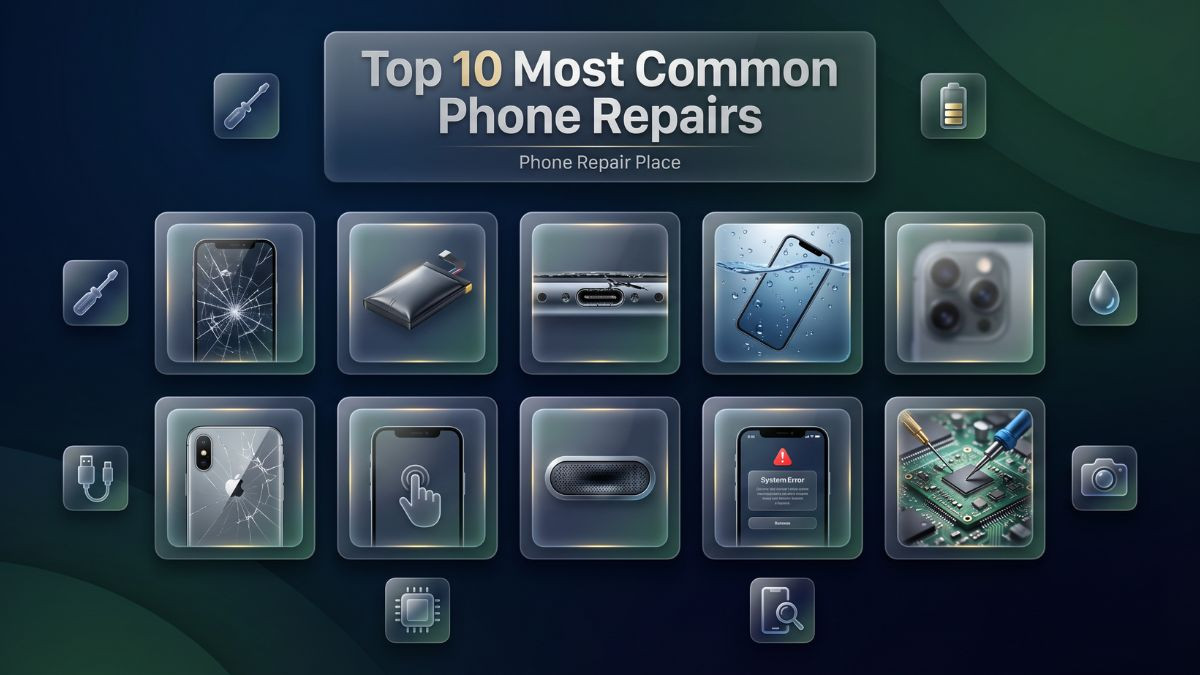
Top 10 Most Common Phone Repairs in 2026
From cracked screen repair to battery replacement, learn the top 10 most common phone repairs in 2026 — with real causes, fix costs, and expert repair guidance.
Every broken phone has a story. Maybe it slipped off a counter while charging. Maybe it survived a year in a back pocket before finally meeting concrete at the wrong angle. Whatever the cause, the result is the same — a device that cost between $700 and $1,400 is now failing at the tasks you rely on most. And the longer a repair is delayed, the more that initial problem compounds into something more expensive.
Smartphones in 2026 are not simply communication tools. The iPhone 17 Pro Max, Samsung Galaxy S25 Ultra, Google Pixel 10 Pro, and OnePlus 13 function as mobile offices, digital wallets, health monitors, navigation systems, and entertainment platforms simultaneously. Losing even partial functionality disrupts daily life in ways that extend well beyond missing a phone call. A cracked screen that touches the digitizer, a battery that shuts off unexpectedly during a work call, or a charging port that stops accepting a cable entirely — these are problems that cascade when left unaddressed.
This article addresses the ten most common phone repairs in 2026 with genuine technical depth. Each repair category is covered from multiple angles: what causes it, what the symptoms look like, what troubleshooting steps are worth attempting at home, what the professional repair process involves, and what realistic costs look like in the current market. The goal is not just to list problems but to give readers the knowledge to act on them intelligently — whether that means a quick home fix or a visit to a trusted repair shop.
Both do-it-yourself approaches and professional repair services are addressed throughout, with honest, experience-based guidance on where the line falls between what is safe for a careful non-technician and what genuinely requires professional tools, training, and experience to execute correctly.
Repair #1 — Cracked Screen Repair
There is no more universal smartphone problem than a cracked screen. Despite genuine advances in protective glass technology — Corning Gorilla Glass Ceramic 2 on the iPhone 17 series, Corning Gorilla Glass Armor 2 on the Galaxy S25 lineup, and increasingly robust ceramic-blend composites across premium Android devices — cracked screen repair remains the number-one reason people walk into a mobile repair shop in 2026. The physics are unforgiving: a large, thin pane of glass suspended in a lightweight frame, falling from waist or chest height onto a concrete or tile surface, concentrates enormous impact energy into a very small contact point.
What Causes Screen Damage
The most obvious cause is a direct drop, but screen damage has more contributing factors than most users realize. Thermal stress plays a meaningful role — repeatedly transitioning between cold outdoor air and warm indoor environments causes the glass to expand and contract at a slightly different rate than the aluminum or titanium frame holding it, creating micro-stress points that weaken the glass over time. Pressure damage from sitting on the phone or placing a heavy bag on top of it can crack the display without any visible impact point. On larger devices like the iPhone 17 Plus or Galaxy S25 Ultra, flexing the device while it is in a back pocket creates bending stress that, over time, can fracture both the display and the frame adhesive bond.
Recognizing the Symptoms
The visible severity of a cracked screen does not always correlate with its functional severity. A single hairline fracture in one corner may be purely cosmetic for weeks while the digitizer and OLED panel underneath remain fully intact. However, cracks spread with continued use as the glass flexes during everyday handling. Once the crack reaches the digitizer layer, touch response begins to fail — typically as a dead zone where swiping or tapping produces no response. OLED panel damage manifests differently: dark blotches that spread outward from the point of impact, color distortion in sections of the screen, flickering lines, or a completely black display that still shows faint backlight glow around the edges. Any of these symptoms beyond a minor cosmetic scratch warrant prompt professional evaluation.
Troubleshooting Before Your Repair Visit
Before heading to a repair shop, take a moment to assess the full scope of the damage clearly and methodically. Test touch response across the entire screen by swiping in grid patterns across all four quadrants. Check whether specific areas fail to respond to touch input — this identifies whether the digitizer is affected and precisely where. Screenshot the damage if the screen still functions, which gives the repair technician a useful reference. Back up your data immediately if the phone is still operational, as screen replacement requires opening the device and there is always a small risk that pre-existing internal damage may surface during disassembly.
How Professional Screen Repair Works
Broken phone display replacement on a current flagship device begins with carefully applying controlled heat to soften the factory adhesive bonding the display to the frame. Specialized prying tools separate the assembly without damaging the chassis or internal components. The display ribbon cables are then disconnected from the logic board connectors with precision tools, and the new display assembly — which on modern fused-layer designs includes the glass, digitizer, and OLED panel as a single bonded unit — is installed and sealed with fresh adhesive. On curved OLED devices like the Galaxy S25 Ultra, the curved edges of the new panel must align precisely with the device's frame geometry, and the adhesive must be applied correctly to restore water resistance after the repair.
Parts Quality Matters Enormously Here
The quality of the replacement screen defines how the phone performs for the life of that repair. Low-cost aftermarket screens often suffer from washed-out colors, reduced peak brightness, lower touch sampling rates, and premature failure. On devices with LTPO OLED panels — including the iPhone 17 Pro, iPhone 17 Pro Max, and Galaxy S25 Ultra — a quality-matched replacement maintains the adaptive 1Hz to 120Hz refresh rate feature. A budget replacement panel typically locks the refresh rate at a fixed rate, affecting both visual smoothness and battery efficiency. Professional shops that respect their customers explain this distinction and offer a clear choice.
Repair #2 — Smartphone Battery Replacement
Smartphone battery replacement service consistently ranks as the second most common repair across all device platforms, and it delivers one of the most dramatic improvements in day-to-day usability of any repair available. A phone that barely gets through half a day on a charge, or one that shuts off unexpectedly at 20 percent, is not just inconvenient — it actively limits how the device can be used.
The Chemistry Behind Battery Aging
Lithium-ion batteries — and the newer silicon-carbon anode cells used in select 2025 and 2026 flagships — degrade through a well-understood electrochemical process called capacity fade. Each charge and discharge cycle causes microscopic changes in the anode and cathode materials that permanently reduce the battery's ability to store and deliver its full charge capacity. This is not a manufacturing defect — it is a fundamental property of the chemistry involved. What accelerates it is consistent deep cycling from 100 percent to zero, exposure to high temperatures during charging, and use of fast chargers that push high current into the battery over extended periods.
The iPhone 17 Pro Max carries a 4,685 mAh battery with support for 35W wired charging and 25W MagSafe. When its health drops to 80 percent — Apple's own threshold for recommending replacement — it effectively operates as a 3,748 mAh battery. Users notice this as the device failing to last through a full workday, running noticeably warm while charging, and shutting down unexpectedly during demanding tasks. The Samsung Galaxy S25 Ultra's 5,000 mAh battery, even with Samsung's silicon-carbon cell improvement, follows a similar degradation trajectory over 18 to 24 months of regular use.
Warning Signs That Should Not Be Ignored
Battery swelling deserves specific attention because it represents a genuine safety concern. When a lithium-ion battery generates internal gas — typically from deep charge cycle damage or physical deformation — it physically expands and pushes against the phone's back panel. On glass-backed devices like the iPhone 17 or Galaxy S25, this creates a visible and tactile bulge at the rear of the phone. A swollen battery should not be charged further, should be kept away from heat sources, and should be brought to a professional repair shop as quickly as possible. Continuing to charge or use a swollen device risks case damage, further expansion, and in severe cases a thermal event.
What the Replacement Process Involves
Professional battery replacement begins with careful disassembly — either through the back panel on most Android devices or through the front display assembly on some iPhone models. The battery is secured with adhesive pull-tabs that, when removed slowly and at the correct angle, release the cell without bending or puncturing it. After the battery connector is detached from the logic board, the replacement cell is installed, connected, and tested for proper capacity reporting and charging behavior before the device is reassembled. Quality replacement batteries are matched to the original model's capacity specifications and connector configuration.
Repair #3 — Charging Port Repair and Fix
Phone charging port repair is the third most requested service and simultaneously one of the most misdiagnosed problems in mobile repair. When a phone stops charging, users frequently assume battery failure. In a significant proportion of cases, the port is entirely at fault, and the battery is perfectly functional.
What Actually Goes Wrong
USB-C ports — universal across all 2026 flagship devices including iPhone 17, Galaxy S25, Pixel 10 Pro, and OnePlus 13 — are used multiple times daily and sustain cumulative mechanical wear from each connection. The contact pins inside the port weaken and can become bent, corroded, or broken entirely. Debris accumulation is the other primary cause and is more common than most users expect: pocket lint compresses at the base of the port over weeks and months into a dense layer that prevents the cable from fully seating and completing the charging circuit. In other cases, physical stress from cables that are tugged sideways rather than pulled straight damages the port housing or creates hairline cracks in the solder joints connecting it to the board.
Diagnosing the Cause at Home
Before concluding that the port needs replacement, a slow charging phone fix may be as simple as a thorough cleaning. Using a non-metallic tool — a plastic toothpick or a wooden dental pick works well — carefully remove the compressed debris from the port opening. A brief burst of compressed air dislodges loose material from deeper in the port. After cleaning, test with a different certified USB-C cable and a different wall adapter. If charging function is restored, debris was the entire cause. If the problem persists despite a clean port and a verified-good cable, the port itself warrants professional inspection. One additional diagnostic check: if wireless charging still functions normally on a device with wired charging issues, the port is almost certainly the cause rather than the battery or charging management circuitry.
Professional Repair Approaches
When professional port replacement is necessary, the approach depends on the device's internal design. On most current Android devices including many Galaxy S25 models, the USB-C port is mounted on a separate flex cable assembly that connects to the main board. Replacement involves disconnecting the old flex assembly and installing a new one — a repair typically completed in 30 to 45 minutes. On certain iPhone models and some compact Android devices, the port is soldered directly to the logic board, which requires microsoldering: removing the failed port under microscope magnification with a hot air rework station and soldering a new component in its place. This is unambiguously a professional-only repair.
Repair #4 — Water Damage Phone Repair
Water damage phone repair solutions represent one of the most technically demanding service categories, and they are also the category where acting fast makes the single biggest difference in outcome. The window between initial liquid exposure and irreversible internal damage is measured in hours, not days.
Understanding What Liquid Actually Does Inside a Phone
When liquid enters a smartphone, it causes damage through two distinct mechanisms. The first is immediate electrical short-circuiting — water conducts electricity and bridges connections on the logic board that must remain isolated, causing components to fail on contact. The second mechanism is progressive corrosion: as liquid evaporates from the board, it leaves behind mineral deposits, salt residue, or organic material from drinks like coffee or juice. These deposits corrode metal traces, solder joints, and IC chip contacts over days and weeks. This explains why some water-damaged phones appear functional immediately after an incident but develop worsening failures gradually over the following week.
IP68 ratings on devices like the iPhone 17 Pro Max and Galaxy S25 Ultra are real but conditional. Laboratory test conditions use clean, still water at controlled depths and temperatures. Real-world exposure to chlorinated pool water, ocean saltwater, coffee, soda, or juice causes substantially more corrosion than clean water. Additionally, the silicone gaskets and adhesive seals that provide water resistance degrade with age — a two-year-old device has meaningfully reduced resistance compared to when it was new.
The Right Immediate Response
Power the device off immediately and do not attempt to restart it. Refrain from charging it under any circumstances — applying voltage to wet components accelerates short-circuit damage. Remove the SIM tray if it is accessible. Do not press buttons repeatedly or shake the device trying to remove water. Most importantly, ignore the rice bowl advice that continues to circulate online — rice provides no meaningful moisture absorption from sealed electronic components and wastes the critical early hours when professional treatment would make the greatest difference. Bring the device to a professional repair shop within hours of the incident.
How Professional Treatment Works
The professional water damage repair process begins with disassembly, battery disconnection to eliminate electrical current flow, and inspection under magnification for corrosion markers — the green, white, orange, or brown discoloration patterns that indicate where liquid has already caused damage. The logic board and affected components are then processed through ultrasonic cleaning: submerged in an electronics-safe cleaning solution and subjected to high-frequency sound waves that agitate and dislodge mineral deposits and corrosion from microscopic gaps between components. After cleaning, the board is inspected under microscope magnification, dried completely, and tested. Components with irreversible damage undergo targeted replacement through microsoldering. Mobile data recovery after damage is also possible in many cases when the storage chip itself is undamaged, even if other board components have failed.
Repair #5 — Camera Repair and Blurry Focus Fix
Mobile camera repair for blurry focus issues has grown significantly as a service category in 2026, driven by the increasingly complex and valuable camera systems on current flagship devices. The five-lens camera system on the iPhone 17 Pro Max and the 200MP quad-camera array on the Galaxy S25 Ultra are optical engineering achievements — and like all precision optical instruments, they can develop issues that meaningfully degrade the photos and videos they produce.
What Causes Camera Problems
The most straightforward cause of a blurry camera image is a cracked or heavily scratched outer lens. Camera lenses on current flagships are covered by sapphire crystal glass — extremely hard but not indestructible. A sharp impact or contact with abrasive surfaces creates scratches or cracks that diffract incoming light and cause images to appear soft, hazy, or covered with visual artifacts. A more mechanically complex cause is optical image stabilization failure. OIS systems use magnetic actuators and gyroscopic sensors to physically move the lens element in compensation for hand movement. When the actuator mechanism fails, handheld shots and video appear shaky regardless of technique. Autofocus failures — where the camera cannot achieve sharp focus regardless of subject distance or lighting conditions — typically point to a failed focus actuator or a disconnected module cable.
Recognizing Camera Symptoms
Consistently blurry photos across all lighting conditions, a camera that takes significantly longer to achieve focus than it previously did, a black camera feed despite the app operating normally, visible horizontal or vertical banding across photos, or an audible rattling sound when the phone is moved all indicate camera module issues requiring professional attention. Testing each camera individually — front, main rear, ultrawide, and telephoto where available — helps isolate which specific module is affected.
Professional Camera Repair
Camera lens cover replacement addresses scratched or cracked outer lens glass without requiring full module disassembly. When the OIS mechanism, autofocus actuator, or image sensor itself has failed, full module replacement is necessary. On multi-camera devices, post-replacement calibration ensures that computational photography features — Portrait mode, optical zoom transitions, night mode fusion across sensors — continue to function correctly after the new module is installed. Technicians performing iPhone repair on Pro models must be especially careful to preserve Face ID sensor array integrity during camera work, as the front sensor cluster and camera share the same assembly housing.
Repair #6 — Back Glass Replacement
Phone back glass replacement service has become a significantly higher-volume repair category as manufacturers have moved overwhelmingly to glass rear panels across both flagship and mid-range devices. The glass back aesthetic delivers a premium feel and enables wireless charging, but it introduces a vulnerability that previous aluminum and polycarbonate backs did not carry.
Why Back Glass Breaks So Easily
The rear glass on devices like the iPhone 17 series, Galaxy S25 Ultra, and Pixel 10 Pro is bonded to the frame with strong adhesive and is typically between 0.5mm and 0.8mm thick — considerably thinner than most users imagine when they pick up the phone. A drop that lands squarely on the rear concentrates impact force directly on this glass, frequently causing it to shatter even when the front screen remains intact. Because rear cases often leave portions of the back exposed — particularly around the camera island — many users believe their phone is protected when it is not.
The Functional Consequences
A cracked back panel is not purely cosmetic. The rear glass is structural — it contributes to the overall rigidity of the chassis, helps seal internal components from moisture and dust, and on MagSafe and Qi2-enabled devices, maintains the precise proximity between the internal wireless charging coil and external charging accessories. A cracked rear glass that breaks the seal around the camera module housing can allow moisture to reach the camera sensors directly, which creates risk for camera failures in addition to the glass damage itself.
The Repair Process
Back glass replacement on modern sealed smartphones requires heat application to soften the factory adhesive, careful controlled prying to lift the cracked glass without disturbing the internal components — including the wireless charging coil, NFC antenna, and battery — underneath. The frame is cleaned of all adhesive residue, and the new glass is positioned precisely and bonded with fresh adhesive under controlled pressure until fully cured. On iPhone 17 models, the back glass is integrated with the aluminum frame in a way that requires specific Apple-designed tooling to remove and replace correctly. Shops offering Samsung repair on Galaxy S25 models must similarly address the ceramic camera housing surround, which is a separate component from the main back glass on Ultra models.
Repair #7 — Touchscreen Not Responding
A touchscreen not working on a mobile device is disorienting in a way that few other failures match — the phone looks fine, the screen lights up, but nothing responds to touch. This particular fault has multiple potential causes that span both hardware and software, and accurate diagnosis before any repair work begins is essential.
Hardware Causes
Physical damage to the digitizer is the most common hardware cause. The digitizer layer sits beneath the outer glass and processes all touch input, tracking finger positions and gestures. A direct impact — even one that leaves the outer glass intact — can crack or disconnect the digitizer internally. Water infiltration reaching the display connectors on the logic board can disrupt touch signal transmission without causing visible display damage. In some cases, a loose or partially disconnected display ribbon cable — often the result of a previous repair that was not assembled correctly — causes intermittent or complete touch failure.
Software Causes
Software issues account for a meaningful proportion of touchscreen failures that appear to be hardware problems. A frozen operating system, a crashed touch driver, or a runaway background application that has captured all touch event processing can make the screen completely unresponsive despite the hardware being fully functional. Failed operating system updates are a particularly common trigger for this in 2026, as both iOS 19 and Android 16 updates have pushed to millions of devices with occasional compatibility issues on specific hardware configurations.
Step-by-Step Troubleshooting
Start with a forced restart — the single most effective first response to apparent touch failure. On iPhone 17 series: press and quickly release volume up, press and quickly release volume down, then hold the side button until the Apple logo appears. On Galaxy S25 series: hold volume down and the power button simultaneously for ten seconds. If touch response returns after the restart, software was the cause. If the phone is unresponsive to any touch input and cannot be restarted via buttons, connect it to a computer and attempt a recovery-mode restore through Apple's Configurator 2 or Samsung's Smart Switch software.
If touch failure is partial — affecting only specific zones of the screen — the cause is almost certainly hardware-related and requires screen assembly replacement following the same professional process as cracked screen repair.
Repair #8 — Speaker and Microphone Repair
Phone speaker and microphone repair addresses one of the most practically disruptive categories of smartphone failure. A phone with degraded audio is difficult to use for calls, video conferencing, navigation instructions, and media playback — which covers the majority of what most people use their phones for throughout the day.
Speaker Failure: Causes and Patterns
Speaker degradation typically develops progressively rather than appearing suddenly. Audio that was once clear and powerful begins to sound thin, crackly, distorted at moderate volumes, or muffled at all volumes. Physical degradation of the speaker membrane from extended use at high volume levels is a common cause, as is moisture exposure that leaves mineral deposits on the membrane. A complete sudden speaker failure — no sound at all from a previously working speaker — may indicate a blown speaker unit, a disconnected speaker cable, or a software audio routing issue. Modern smartphones have multiple speaker configurations: the earpiece speaker for call audio, the bottom-firing speaker for media, and sometimes a dedicated tweeter — each can fail independently.
Microphone Issues
Callers reporting they cannot hear you, voice assistant commands failing to register, or voice memos recording silence or extremely faint audio all indicate microphone failure. Current flagship devices carry two to four microphone elements positioned around the chassis for noise cancellation, stereo recording, and directional audio capture. A failed bottom microphone affects call audio and voice commands; a failed rear microphone affects video recording quality; a failed top microphone impacts noise cancellation during calls. Debris blockage of the microphone port — the small pinhole opening visible on the device frame — is common and often resolved by professional cleaning without any part replacement.
Repair Process
Speaker replacement involves carefully opening the device, removing the speaker assembly from its housing, disconnecting it from its connector or desoldering it from the board, and installing a matched replacement. Microphone replacement requires identifying which of the multiple microphone elements has failed through targeted diagnostic testing — replacing the wrong one wastes both parts and labor. Both repairs are well within the capability of a trained technician and typically complete within 30 to 60 minutes for most current device models.
Repair #9 — Software Issues and Phone Troubleshooting
Software issues and phone troubleshooting represent a category that repair shops increasingly encounter as smartphone operating systems become more complex and update cycles accelerate. Not every phone problem requires a replacement part. A meaningful proportion of failures — including boot loops, severe performance degradation, random crashes, and functional failures of specific features — have entirely software-based causes that trained technicians can resolve without opening the device at all.
Common Software Problems in 2026
Operating system corruption from a failed update is one of the leading software causes of phone dysfunction heading into 2026. Both iOS 19 and Android 16 have been significant updates pushed to hundreds of millions of devices, and compatibility issues with specific hardware configurations occasionally leave devices in a non-functional state. App conflicts from poorly updated third-party applications can cause system functions to fail or cause the device to restart repeatedly. Storage saturation — a phone filled to near-maximum capacity — causes severe performance degradation because both iOS and Android require a buffer of free storage space to manage virtual memory and temporary files effectively.
Practical Troubleshooting Sequence
The troubleshooting sequence for software issues follows a logical progression from least to most invasive. A forced restart resolves a surprising proportion of apparent software failures and should always be the first step. Checking for and installing pending OS updates addresses known bugs that may be causing the issue. Uninstalling recently installed apps — particularly those installed just before the problem began — isolates app conflicts. Clearing the cache partition on Android devices (accessible through recovery mode) resolves corrupted temporary file issues without affecting personal data. A factory reset — which returns the operating system to a clean baseline — resolves the vast majority of persistent software issues but requires a full data backup first.
When Professional Software Service Is Needed
If a factory reset does not resolve the issue, the problem likely lies at the firmware level — corrupted OS partition data that requires reflashing the operating system using specialized computer-based tools. For iPhones, Apple's Configurator 2 can perform a complete firmware restore. For Samsung devices, the Odin flashing tool performs the same function. These procedures are straightforward for experienced technicians and can restore devices that appear completely non-functional — stuck in boot loops or failing to power on at all — to full working order without any hardware replacement.
| Software Issue | Self-Repair Option | Professional Solution | Data Risk |
|---|---|---|---|
| App crash / freeze | Force restart, clear cache | App reinstall, OS diagnostic | None |
| Boot loop | Recovery mode factory reset | Firmware flash via PC tools | High without backup |
| Failed OS update | Retry via Settings | Full OS reflash | Medium |
| Storage corruption | Clear space, restart | Partition repair or full flash | Medium |
| Touch / display driver bug | Software update | Driver reinstall via firmware | Low |
| Forgotten passcode / lock | Apple/Google account recovery | Professional unlock procedure | Low |
| Persistent random restarts | Factory reset | Board-level diagnostic | High without backup |
Repair #10 — Motherboard Repair and Microsoldering
Phone motherboard repair and microsoldering occupies a category of its own — the most technically demanding, most equipment-intensive, and most specialized repair available at a professional shop. It is also the repair that separates a genuinely advanced repair facility from a shop that performs only module-level replacements.
What Causes Logic Board Failures
Water damage is the most common cause of logic board failure in 2026. Liquid penetration and subsequent corrosion attack the microscopic traces, solder joints, and IC chips on the board in ways that simple module replacement cannot address. Physical trauma from severe drops can crack the board itself or fracture the solder joints connecting critical integrated circuits to the board. Power surge damage from non-certified charging accessories that deliver incorrect voltages destroys power management ICs responsible for regulating charging current and battery output. Long-term solder joint fatigue — where years of thermal cycling cause microscopic cracks to develop in solder joints — produces intermittent failures that are notoriously difficult to diagnose.
What Microsoldering Actually Involves
Microsoldering is component-level repair performed under high-magnification stereoscopic microscopes. A trained technician identifies the failed component — sometimes as small as 0.2mm — among hundreds of identical-looking elements on a densely populated circuit board. A hot air rework station precisely heats the target component and the surrounding solder, allowing the failed part to be lifted without disturbing adjacent components. Fresh flux is applied to the solder pads, a replacement component is positioned with fine-tipped tweezers under magnification, and new solder is applied to bond it in place. The completed joint is inspected under the microscope for quality before the board is reassembled and tested.
Common microsoldering repairs in 2026 include power management IC replacement for devices that will not charge or turn on, NAND flash repair for mobile data recovery after damage to the storage chip, Touch IC replacement for persistent digitizer failures not resolved by screen replacement, and Face ID infrared projector repairs on iPhone devices where the biometric system has failed due to board-level damage rather than sensor physical damage.
Why This Cannot Be Approximated at Home
The equipment required for professional microsoldering — quality stereo microscopes providing 10x to 45x magnification, precision hot air rework stations with fine-tipped nozzles, PCB holders and clamps, quality flux and high-purity solder, and a comprehensive component library — represents several thousand dollars of investment. Beyond equipment, the skill required to correctly identify failed components among hundreds of identical parts on a modern logic board comes from years of focused practice under experienced mentorship. An attempted board repair by an unqualified individual invariably causes permanent additional damage and makes subsequent professional recovery significantly more difficult.
DIY vs. Professional Repair: A Side-by-Side Comparison
Knowing where the line falls between a reasonable home repair attempt and a job that genuinely requires professional skill protects both your device and your budget. The following table summarizes each of the ten repairs covered in this article with honest DIY feasibility assessments.
| Repair Type | DIY Feasibility | Risk Level | Professional Recommended? | Typical Shop Time |
|---|---|---|---|---|
| Cracked screen (older flat OLED) | Moderate | Medium | Recommended | 45–90 min |
| Cracked screen (LTPO curved flagship 2026) | Very Low | Very High | Absolutely | 60–120 min |
| Battery replacement (accessible design) | Moderate | Medium | Recommended | 30–45 min |
| Battery replacement (sealed flagship 2026) | Low | High | Strongly Yes | 45–60 min |
| Charging port cleaning | High | Very Low | Optional | 15–30 min |
| Charging port replacement (flex cable) | Moderate | Medium | Recommended | 30–45 min |
| Charging port replacement (soldered) | None | Very High | Absolutely | 60–90 min |
| Water damage treatment | None | Extreme | Absolutely | 2–24 hrs |
| Camera lens replacement | Low | High | Recommended | 30–60 min |
| Back glass replacement | Low | High | Recommended | 45–90 min |
| Touchscreen (software cause) | Moderate | Low | Optional | 30–60 min |
| Touchscreen (hardware/digitizer) | Low | High | Recommended | 45–90 min |
| Speaker / microphone cleaning | Moderate | Low | Optional | 15–30 min |
| Speaker / microphone replacement | Low | Medium | Recommended | 30–60 min |
| Software troubleshooting / factory reset | Moderate | Low–Medium | Optional | 30–90 min |
| Firmware flash / OS restore | Low | Medium | Recommended | 60–120 min |
| Motherboard microsoldering | None | Extreme | Absolutely | 2–8+ hrs |
What Phone Repairs Actually Cost in 2026
Repair pricing in 2026 reflects several converging factors: the increasing complexity of flagship display technology, the rising component cost of LTPO OLED and foldable panels, and the specialized labor cost of technicians who maintain current knowledge and equipment for the latest devices. Affordable phone repair for a business that delivers quality work means fair pricing that reflects genuine part and labor costs — not the cheapest available.
The ranges below reflect quality repairs using appropriate replacement components at a professional mobile repair shop in the mid-Atlantic United States market. Prices vary by region, device model, and part tier selected.
| Repair Type | Older / Budget Device | Mid-Range 2024–2025 | Flagship 2025–2026 |
|---|---|---|---|
| Screen Replacement | $60–$110 | $130–$220 | $200–$400 |
| Battery Replacement | $50–$75 | $75–$110 | $90–$130 |
| Charging Port Cleaning | $15–$30 | $15–$30 | $15–$30 |
| Charging Port Replacement | $50–$70 | $70–$120 | $90–$160 |
| Water Damage Treatment | $60–$90 | $90–$160 | $120–$280+ |
| Camera Lens Replacement | $40–$65 | $65–$120 | $100–$200 |
| Back Glass Replacement | $40–$70 | $70–$130 | $120–$230 |
| Speaker Replacement | $40–$60 | $60–$90 | $80–$130 |
| Microphone Replacement | $40–$60 | $60–$90 | $80–$130 |
| Software Troubleshooting | $30–$60 | $50–$80 | $50–$100 |
| OS Flash / Firmware Restore | $50–$80 | $70–$100 | $80–$120 |
| Motherboard Microsoldering | $80–$150 | $150–$300 | $200–$500+ |
| Foldable Inner Screen | N/A | N/A | $400–$600 |
A price significantly below the low end of these ranges almost always indicates a repair using substandard parts. A single failed replacement that requires a repeat repair visit costs more in total than a quality repair done correctly the first time.
Choosing the Right Mobile Repair Shop
With so many smartphone hardware repair services competing for business in any given market, evaluating a repair shop carefully before handing over a device worth $800 to $1,300 is a reasonable investment of five minutes. Several clear criteria distinguish a trustworthy, quality-focused shop from one that cuts corners.
Technician experience with current devices is the first and most important factor. A shop that is comfortable servicing iPhone 15 and Galaxy S23 devices but has not worked with the iPhone 17 Pro Max or Galaxy S25 Ultra is not the right choice for your current flagship. Ask directly whether the shop has serviced your specific model and what their success rate looks like for that repair type.
Transparent pricing and written estimates before work begins are non-negotiable markers of professionalism. A shop that provides a clear, itemized written quote — breaking down parts cost and labor separately — and sticks to that quote is one that respects its customers. Any shop that gives vague verbal estimates or adds charges after the repair is complete should not receive your business.
Part quality transparency is equally important. Professional shops are willing to tell you exactly what category of replacement part they use — budget aftermarket, premium aftermarket, or OEM-equivalent — and explain the functional differences between them. They may offer tiered pricing to accommodate different budgets, but they never install a substandard part without the customer's informed knowledge.
Warranty coverage on both parts and labor is the clearest single indicator of a shop's confidence in its own work. A 90-day to one-year warranty is standard at quality repair shops. Anything shorter deserves scrutiny, and no warranty at all should be a firm dealbreaker. Customer reviews on Google Maps and Yelp provide real-world evidence of consistent service quality across many customers over time — more reliable than any marketing claim.
Call to Action: Visit Phone Repair Place Today
A broken phone does not have to derail your day. Whether the screen is cracked, the battery can barely make it to noon, the charging port stopped responding, or something more complex is failing beneath the surface, the professional team at Phone Repair Place is ready to diagnose and fix it — fast, reliably, and at a price that makes genuine sense.
Conveniently located at PG Mall in Hyattsville, MD, Phone Repair Place serves the greater Washington DC and Maryland area with same-day repair services for the most common smartphone faults and fixes. Technicians are experienced with the full range of current 2026 devices — including iPhone 17 series, Samsung Galaxy S25 series, Google Pixel 10 Pro, foldable devices, and popular mid-range Android models. Every repair uses quality replacement parts, and every job is backed by a parts and labor warranty, so you can walk out with genuine confidence in the repair that was performed.
No appointment is necessary. Walk-ins are welcome during business hours. Whether you need a quick screen replacement, a battery swap, a thorough charging port cleaning, or a complex water damage recovery, the team is equipped to handle it. Alternatively, call ahead to confirm parts availability for your specific device and get an upfront repair estimate before you make the trip.
Do not let a broken device cost you more time, income, or frustration than it already has. Bring it in, get a free diagnostic assessment, and let experienced technicians restore it to full working condition — often within the same visit.
Phone Repair Place
3500 East-West Hwy STE 1417,
Hyattsville, MD 20782, United States
Phone: (202) 870-4914
Website: https://phonerepairpgmall.com/
Frequently Asked Questions
Q1: What is the most common phone repair in 2026, and how quickly can it be fixed?
Cracked screen repair remains the most frequently performed smartphone repair across both iPhone and Android platforms in 2026. At a professional repair shop with current-model parts in stock, most screen replacements on flagship devices are completed within 60 to 90 minutes. Fast phone repair services like those at Phone Repair Place aim to complete the most common repairs the same day, often while you wait.
Q2: How do I know if my phone's battery needs replacing or if the charging port is the problem?
The clearest way to distinguish between the two is to test wireless charging separately from wired charging. If wireless charging functions normally but wired charging is slow or intermittent, the charging port is almost certainly the cause. If both charging methods are slower than expected and the battery drains unusually fast regardless of usage, battery degradation is the more likely culprit. A professional diagnostic check at a smartphone hardware repair service near you identifies the exact cause before any parts are ordered or replaced.
Q3: Can water-damaged phones be recovered even if they seemed fine at first?
Yes, and this situation is actually quite common. Many water-damaged phones appear functional immediately after exposure because the damage is initially limited to corrosion that develops over the following hours and days rather than an immediate short circuit. Water damage phone repair solutions are most effective when applied quickly — bringing the device in for professional ultrasonic cleaning within hours of exposure dramatically increases recovery odds compared to waiting until visible symptoms appear.
Q4: Is it worth paying for professional microsoldering repair on an older phone?
The answer depends on the device's current value and what data or functionality is at stake. For a device worth less than $200, extensive motherboard repair may not be economically justifiable. However, when mobile data recovery after damage is the goal — recovering irreplaceable photos, messages, or work data from a device that cannot be backed up through conventional means — microsoldering repair is often the only viable path regardless of the device's market value.
Q5: What should I do immediately after my phone gets wet to improve recovery chances?
Power the device off immediately — this is the single most important step. Do not charge it, do not press buttons repeatedly, and do not place it in rice. Remove the SIM tray if accessible and keep the device at room temperature. Bring it to a professional mobile repair shop as soon as possible, ideally within the first two to four hours. The faster professional ultrasonic cleaning treatment begins, the better the chances of a full recovery before corrosion advances to critical components.
Q6: How long does a software troubleshooting or OS restore take at a repair shop?
Software troubleshooting duration varies based on the specific issue. A forced restart or cache clearing typically takes under 15 minutes. A factory reset takes 30 to 60 minutes including setup. A full firmware flash or OS restore via computer-based tools typically requires 60 to 120 minutes depending on the device and the extent of the corruption. A professional technician will always attempt data backup before any data-erasing procedure, which adds time but protects your information throughout the process.
Discover powerful online free tools for SEO, web development, content writing, marketing, and productivity.